|
|
 |
Nfield update
|
30 April 2024
|
|

|
|
On Tuesday, 30 April, we will release a new version of Nfield. This update contains a new addition to the Survey Groups functionality, an ability to start an interview simulation from the public API, additions to the Hints file functionality of the Interview Simulator, a notification about the upcoming CAPI client v.2.37 release with the ability to skip quota page before an interview, a new NIPO ODIN Developer, a new NIPO DSC for IBM SPSS, and some smaller improvements.
|
Survey Groups in the Nfield Manager
|
|
These updates have been made to the Survey Groups functionality:
|
|
•
|
|
You can now assign directory users to a survey group in the Global Survey Group Assignments tab of the Access tab.
|
|
•
|
|
You can also now assign and unassign multiple local users to one survey group in the Groups tab by clicking the relevant survey group's name, and clicking on the Local User Assignments button that appears below it.
|
|

|
|
Click image to enlarge
|
|
Start a simulation from Public API
|
|
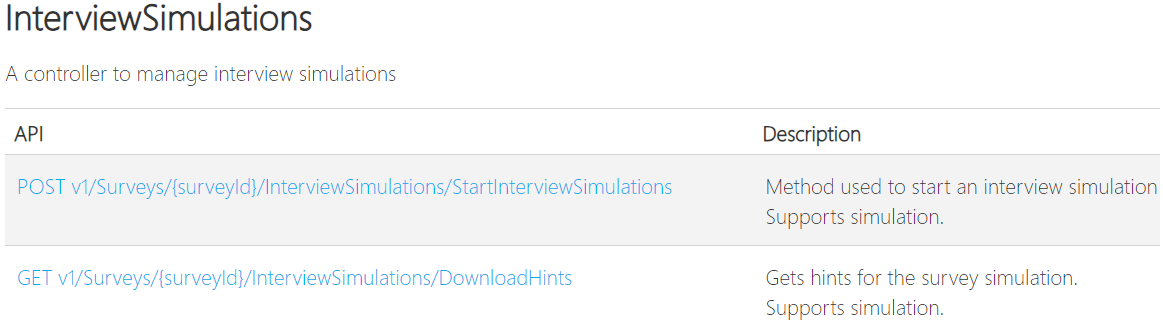
Now it is possible to run an interview simulation using the Public API. The below new endpoints can be used to start and download the hints for a simulation.
|
|
|
Click image to enlarge
|
|
|
As an example, for the Europe region more information can be found on the Nfield API Help page. Please also check out the Nfield SDK (Software Development Kit) repository which contains examples using Postman.
Please contact your regular support channels to switch on this functionality in your domain.
|
Hints file (Interview Simulator)
|
|
•
|
|
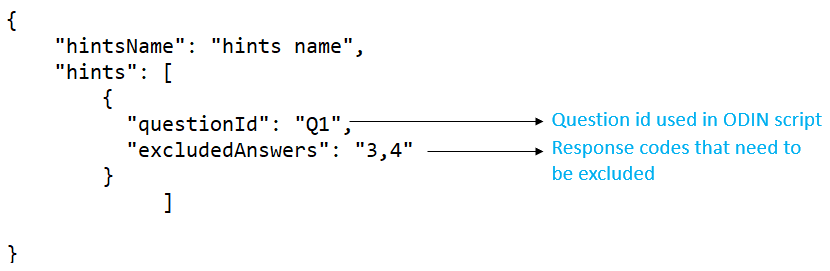
Based on the few user requests now we have extended the Hints functionality to exclude specific response codes through Hints.
|
|
|
|
Click image to enlarge
|
|
|
•
|
|
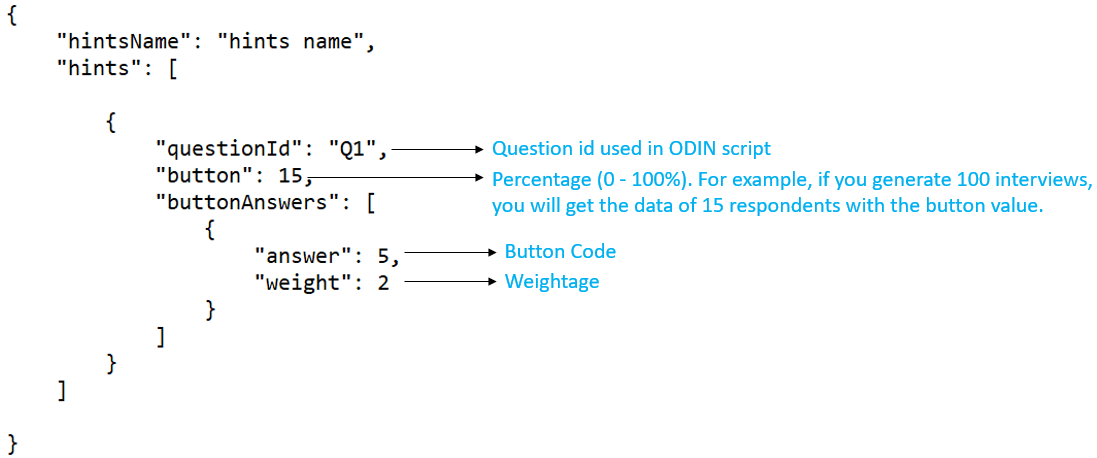
It is now possible to specify a percentage for the *BUT responses through Hints to get the desired data for *BUT codes.
|
|
|
|
Click image to enlarge
|
|
CAPI Client: Skip quota page before interview
|
|
In the coming weeks we will release a new CAPI Client version (2.37) which will contain a new feature. Currently, when an interviewer wants to start an interview on a survey for which quota have been configured, a quota page is shown. The interviewer is prompted to select the appropriate quota level(s) before he can continue into the interview. There may be scenarios where you do not wish the interviewer to have to do this, for instance if your questionnaire contains questions to set the quota variables.
With the current release, we have introduced a Survey Setting to instruct the CAPI app to skip the quota page. This setting is set to "False" by default (at survey creation) and can be changed in the Nfield Manager using the toggle "Skip quota page before interview" under Setup Survey > Fieldwork. The toggle is only visible for surveys for which a quota frame has been configured.
The setting can also be changed through the Public API using the POST v1/Surveys/{surveyId}/Settings endpoint by including "Name":"HideQuotaPage"; "Value":True in the request body.
Please note that you need a CAPI client version 2.37 or later installed for this feature to work.
|
NIPO ODIN Developer version 5.18.028
|
|
An updated version of the NIPO ODIN Developer will be available later this week and can be downloaded from the NIPO website. This latest version has the below update:
|
|
•
|
|
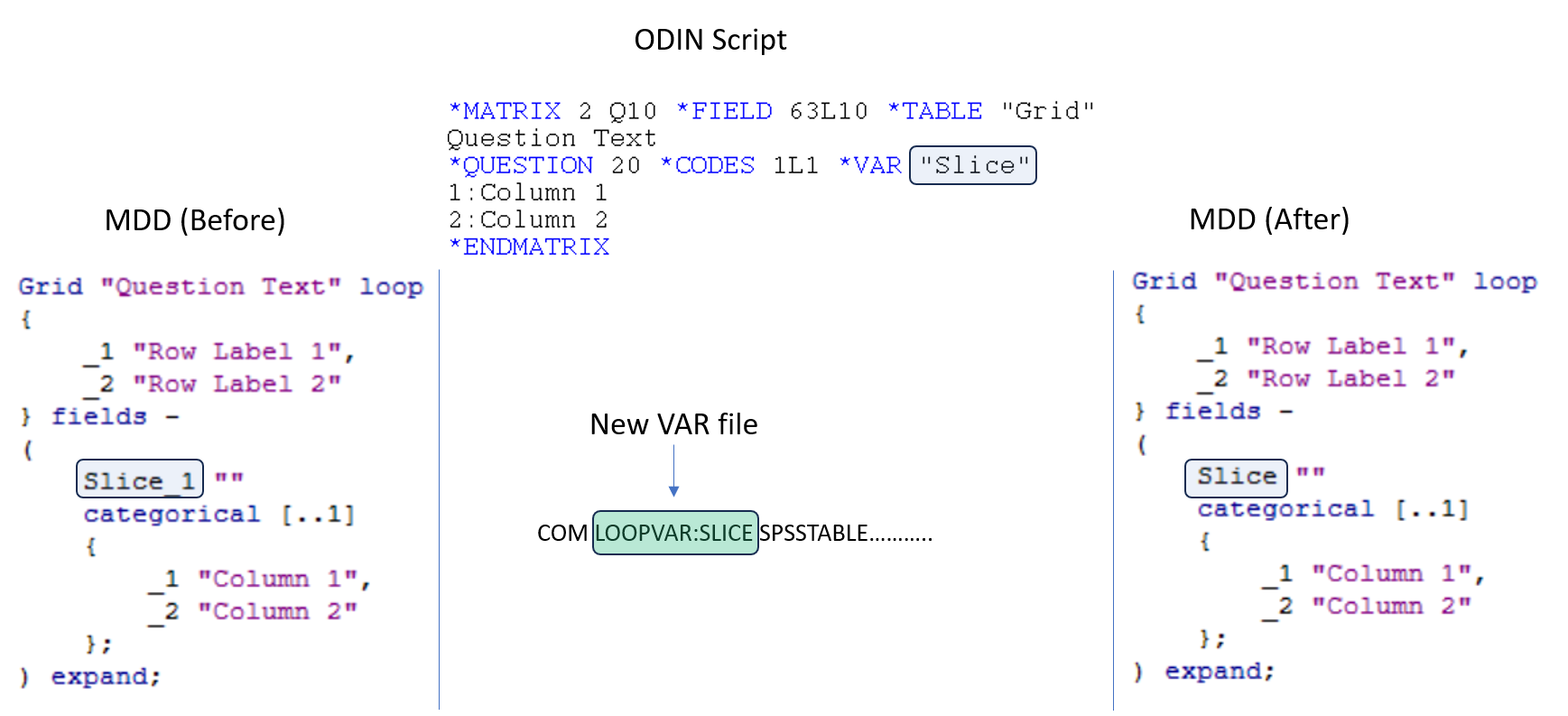
This updated version will add the comment "COM LOOPVAR: {Variable name} SPSSTABLE…." in a VAR file. This addition will help to generate the new NIPO DSC for IBM SPSS to get original variable names for the Matrix or Repeat questions when a mdd file is generated.
|
|
•
|
|
The above update also applies when you download a VAR file using the Nfield Manager.
|
|
NIPO DSC for IBM SPSS 2.00.020
|
|
The most recent version of the NIPO DSC for IBM SPSS software, version 2.00.020, is available for download from the NIPO website.
What has been changed in this version:
|
|
•
|
|
Now it is possible to get original variable names into variable definition in 'DSC-generated' mdds for the Matrix or Repeat questions. Before, "_1" was always added to the variable names in 'DSC-generated' mdds. Below is the screen shot for your reference to help you understand in detail.
|
|
|
|
Click image to enlarge
|
|
Ensure email invitations get delivered
Email service providers implement a range of checks before allowing to reach an inbox. Read the best practices to pass these checks.
Read article
|
As always, please share this information with all relevant people in your organization.
|
|